Feels Better: Infusing Funky Serif Charm into Your Designs
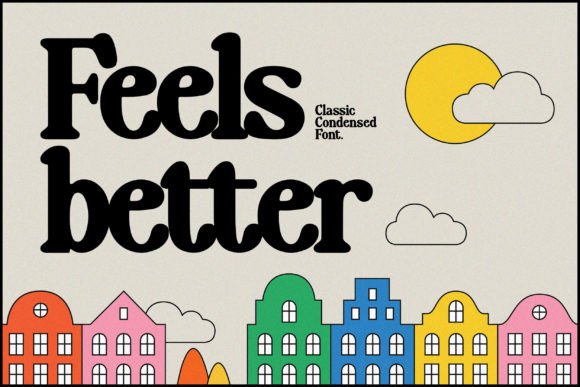
In a digital world saturated with minimalist sans-serifs and predictable geometric shapes, finding a typeface that genuinely feels distinct can change the entire trajectory of a design project. Feels Better is exactly that kind of font—a cool, funky serif display typeface that refuses to blend into the background. It is not merely a set of characters; it is a tool for expression. If you are a creator, marketer, or entrepreneur looking to inject personality into your visual identity, understanding how to leverage the unique charm of this font can open up new creative possibilities.
The Anatomy of "Funky" Serifs
To understand why Feels Better works, we have to look at what defines a "funky" serif. Unlike traditional serifs that rely on strict geometry and high contrast—think Times New Roman or Garamond—a funky serif introduces irregularity. It might feature uneven baselines, exaggerated curves, or serifs that look more like brushstrokes than precise cuts.
Feels Better embodies this by balancing legibility with artistic flair. It retains the structure of a serif, ensuring that words are recognizable and readable at a glance, but it adds enough texture to make the text feel hand-drawn or retro-inspired. This balance is crucial. You want a font that grabs attention, but not at the expense of clarity. When you use Feels Better, you are signaling to your audience that your brand or project values creativity, nostalgia, and authenticity over corporate sterility.
Strategic Applications for Different Creators
Every designer or business owner has different needs. The versatility of Feels Better lies in its ability to adapt to various contexts without losing its core identity. Here is how different professionals can apply this font to their specific goals.
For Brand Builders and Entrepreneurs
Brand identity is about differentiation. If you are launching a product that focuses on sustainability, artisanal goods, or lifestyle coaching, you want a voice that feels human. Feels Better works exceptionally well for logos and primary headers. It suggests that there is a real person behind the business, not just an algorithm.
- Logo Design: Use the font in all caps with generous tracking (letter spacing) for a sophisticated yet approachable look.
- Business Cards: Pair it with a clean, light sans-serif for your contact details to let the font’s character shine without overwhelming the reader.
- Packaging: For small-batch products, the textured look of this font implies craftsmanship and care.
For Marketers and Content Creators
Attention is the currency of the internet. In email marketing or social media, a standard font often gets scrolled past. Feels Better acts as a pattern interrupt. Its distinct silhouette stops the thumb-scroll.
- Social Media Graphics: Use it for the "hook" text on Instagram carousels or YouTube thumbnails. The funky style implies energy and entertainment.
- Blog Headers: A bold, stylized header can set the tone for an article, making even technical topics feel more accessible and less dry.
- Newsletter Banners: Create a consistent visual identity for your weekly updates that readers recognize instantly in their crowded inboxes.
For Educators and Publishers
Education does not have to be boring. While you wouldn't use a display font for body text, Feels Better is excellent for breaking up dense information. Use it for chapter titles in workbooks, slide deck headers, or poster titles for school events. It brings a playful energy that can make learning materials feel more inviting to students of all ages.
Pairing and Composition: Creating Balance
The most common mistake with display fonts is overuse. Because Feels Better has such a strong personality, it needs to be anchored by something quieter. This is where the principle of contrast comes into play.
Imagine a poster design. If the headline is in Feels Better, the subheadline and body copy should be something highly legible and neutral. A classic sans-serif like Helvetica, Open Sans, or Roboto works perfectly. The sans-serif acts as the canvas, allowing the serif to pop.
Consider the hierarchy of your information. Use Feels Better for the top-level message—the "what." Use your secondary font for the details—the "how" and "why." This structure guides the reader’s eye naturally from the artistic element to the practical information.
Color Theory and Texture
Typography rarely exists in a vacuum; it interacts with color and background textures. Feels Better has a retro quality that pairs beautifully with specific color palettes.
Earth Tones: Muted greens, terracotta, and beige backgrounds can ground the font, making it feel organic and eco-friendly. This is ideal for wellness brands or outdoor adventure blogs.
Pastels and Neons: On the other end of the spectrum, pairing the font with a soft pastel background creates a modern, trendy aesthetic often seen in the fashion industry. Conversely, a neon pink or electric blue on a dark background gives it a synth-wave, 80s-inspired vibe perfect for music events or gaming channels.
Texture is another factor. Because Feels Better has a display quality, it often looks best when the background has some depth. A slight paper grain texture, a subtle noise overlay, or a watercolor wash can enhance the font's charm, making the digital design feel tangible.
Contextual Use: When to Use and When to Restrain
Creativity requires restraint. Just because a font looks cool doesn't mean it belongs everywhere. To maintain professionalism and user experience, adhere to these guidelines:
- Headlines and Titles Only: Never set a full paragraph in Feels Better. It will hurt the eyes and ruin the reading experience. Keep it for short bursts of text.
- Large Sizes: Display fonts are designed to be seen big. At small sizes, the unique quirks of the serifs might turn into visual noise or blur together. Always use it at sizes 24px and above.
- Emphasis, Not Everywhere: If you use it on a website, use it for the main landing page hero section. Don't use it for every single H2 and H3 tag, or the impact will be diluted.
Practical Inspiration: Project Ideas
If you have downloaded Feels Better and are staring at a blank canvas, here are three specific project ideas to get you started:
The "Zine" Style Newsletter: Create a digital newsletter that mimics the aesthetic of a 90s fanzine. Use Feels Better for the title and cutout-style headers. Combine it with black and white photography and ransom-note style collage elements. This works great for music critics, indie artists, or cultural commentators.
The Modern Café Menu: Design a menu for a coffee shop or bakery. The font's warmth suggests that the food is homemade. Pair it with hand-drawn illustrations of coffee cups or pastries. Use a textured cardstock background color to complete the look.
The Podcast Cover Art: Podcasts rely heavily on thumbnails. A bold, funky serif can communicate the vibe of the show instantly. Whether it’s a comedy podcast or a storytelling series, Feels Better sets a tone of fun and conversation before the listener even presses play.
Conclusion: Trusting Your Gut
Design is subjective, but connection is objective. Feels Better is a tool designed to foster connection through personality. It reminds us that design doesn't have to be rigid or overly corporate. By understanding its strengths—its warmth, its funk, and its versatility—you can apply it to projects that need a human touch. Whether you are designing a logo for a startup or a flyer for a local community event, choosing a font that feels right is half the battle. Let your typography do the talking, and watch how it transforms the way your audience perceives your work.