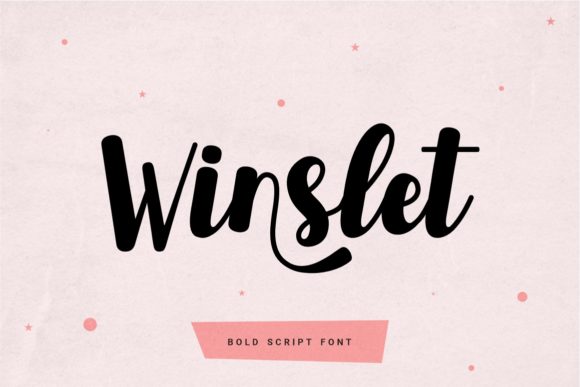
Winslet: Integrating a Luxury Handwritten Font into Professional Workflows
In the world of digital design and branding, typography is rarely just about selecting a font. It is a strategic decision that impacts readability, user experience, and the overall perception of a brand. Winslet, a cursive and thick lettered handwritten font, offers a specific aesthetic quality: a luxury spark with a unique, personal feel. While it is visually stunning, its true value in a professional setting lies in how it is implemented within a broader design workflow. For professionals, creators, and business owners, understanding where and how to deploy a script font like Winslet is essential for maintaining both efficiency and quality.
Understanding the Asset: What Winslet Brings to the Table
Winslet is characterized by its cursive flow and thick strokes. Unlike thin, delicate scripts that can disappear on screens, Winslet’s weight ensures it retains presence. This makes it a strong candidate for high-impact areas where legibility at medium to large sizes is required. It is designed to evoke elegance and personality, moving a project away from the sterile, corporate look of standard sans-serifs.
A critical technical feature of Winslet is its PUA (Private Use Areas) encoding. For those unfamiliar with font engineering, PUA encoding means that the decorative glyphs, ligatures, and swashes are not standard Unicode characters. Instead, they are mapped to special codes accessible through character maps or specific design software panels. This distinction is vital for workflow planning: if you are working in a basic text editor, you will only see the standard characters. To unlock the "stunning impact" and luxury feel described in the font's design, you must be working in an environment that supports glyph substitution, such as Adobe Illustrator, Photoshop, or advanced Canva Pro features.
Strategic Placement: Pre-Production and Brand Planning
Before opening your design software, Winslet should be evaluated during the planning and decision-making phase. A common mistake in branding is choosing a font because it looks trendy, only to discover it conflicts with the brand’s voice or technical requirements.
Compatibility Checks
Integrating Winslet effectively requires checking its interaction with your primary typeface. Most brands use a hierarchy: a display font for headlines, a body font for paragraphs, and an accent font for specific callouts. Winslet fits naturally into the accent or display category.
- Pairing Strategy: Because Winslet is thick and cursive, it pairs best with clean, geometric sans-serifs or elegant serifs with high x-heights. Avoid pairing it with other decorative fonts, as this creates visual noise. In your style guide, define Winslet as the font for "Hero Text," "Pull Quotes," or "Logo Wordmarks" only.
- Technical Validation: Verify that Winslet supports the specific languages you need. If your project targets an international audience, ensure the font includes the necessary diacritics and special characters. This prevents the need to swap fonts mid-project, which disrupts consistency.
Implementation in the Creative Process
Once the planning is complete, Winslet moves into the execution phase. This is where the PUA encoding becomes a practical tool rather than just a technical specification. The implementation process varies depending on the platform you are using.
Accessing Glyphs and Ligatures
To utilize the full potential of Winslet, you need to access the OpenType features. In professional software like Adobe Illustrator, you can select the text and open the "Glyphs" panel. This allows you to view every variation of a letter.
For example, a standard "t" might look functional, but the Glyphs panel may reveal an alternate "t" with an extended crossbar or a looping tail. These alternates are what give the font its luxury feel. In a workflow context, this step should happen during the refinement stage, not the initial drafting stage. Draft your content with standard characters to ensure the layout works, then swap in the stylistic alternates to polish the design.
Workflow Integration for Digital Assets
When creating digital assets such as social media graphics or email headers, speed is often a priority. However, rushing the application of a script font can lead to poor kerning (spacing between letters).
- Kerning Adjustments: Handwritten fonts often require manual kerning. The connection points between letters in cursive fonts can sometimes look disjointed if the software’s auto-kerning isn't optimized for that specific font. Before finalizing a design, zoom in on the text and manually adjust the spacing to ensure the letters connect seamlessly.
- Color and Background: Because Winslet has "thick lettered" strokes, it can handle solid colors well. However, placing it over busy photography can reduce legibility. In your workflow, include a step to apply a slight drop shadow or a semi-transparent overlay behind the text if the background is complex.
Organizing and Managing Font Assets
For freelancers and small business owners, asset management is a key component of efficiency. Installing a font like Winslet is just the beginning; organizing it ensures you can find it when needed.
Font Management Software
If you have a large library of fonts, your system can slow down, and finding the right font becomes a chore. Use a font management tool (like FontBase or Adobe Fonts) to create sets or folders. Create a folder specifically for "Script & Decorative" fonts and categorize Winslet there. This allows you to activate the font only when you are working on a project that requires that specific luxury aesthetic, keeping your system resources optimized.
Consistency Across Teams
If you work with a team or outsource design work, consistency is paramount. When handing off a project that uses Winslet, provide a style sheet that details:
- Which specific glyphs/alternates are approved for use (e.g., "Use the swash version of the capital 'W' for the logo only").
- Size constraints (e.g., "Do not use below 24pt for readability").
- Color codes used for the font.
This documentation prevents the "luxury spark" from being misinterpreted as "messy" by another designer who might not know how to use the font's features correctly.
Long-Term Use and Quality Control
A font is an investment in your visual identity. To ensure Winslet continues to serve your projects effectively over time, consider the following long-term strategies.
Readability Testing
While Winslet is designed for impact, always test your designs on multiple devices. A thick cursive font that looks elegant on a desktop monitor might become a blob of ink on a small mobile screen. Before publishing, view your design on a smartphone to ensure the "unique feel" translates to smaller resolutions. If it doesn't, you may need to use Winslet only for desktop-specific assets or increase the font size significantly for mobile layouts.
Contextual Relevance
Design trends shift, but quality typography remains relevant. Winslet is best suited for industries like beauty, fashion, luxury goods, high-end hospitality, and wedding planning. If your business pivots or expands into more technical sectors (like SaaS or heavy machinery), re-evaluate if the handwritten style still aligns with your new audience. Good workflow includes periodic brand audits; during these audits, check if your typography still matches the message you want to convey.
Conclusion
Winslet is more than just a collection of letters; it is a tool for adding personality and sophistication to a design system. By treating it as a strategic asset—checking compatibility, managing glyph access, ensuring legibility, and documenting usage guidelines—you can integrate it smoothly into your professional workflow. Whether you are a freelancer crafting a logo or a marketer designing a landing page, the key to success with Winslet lies in the balance between its decorative nature and your functional requirements. When implemented with care, it elevates the final product from a simple layout to a memorable brand experience.